The 7-Second Resume Scan: What Recruiters See
Recruiters spend 7.4 seconds on initial resume scans. Eye-tracking research reveals exactly where they look and what you must put there.

Raman M.
Software Engineer & Career Coach
On this page
Build a resume that gets interviews
- ATS-optimized templates
- AI-powered writing
- Free to start
No credit card required
You've heard the statistic: recruiters spend an average of 7.4 seconds on initial resume review.
But what happens during those 7.4 seconds? Where do their eyes actually go? What information do they absorb?
Eye-tracking research provides specific answers. Understanding the visual patterns of resume review helps you position critical information where it will actually be seen.
What the Research Shows
The Ladders Study
The most-cited research comes from TheLadders, a job search firm that conducted eye-tracking studies on recruiters reviewing resumes.
Key findings:
- Recruiters spend an average of 7.4 seconds on initial resume review
- Their eyes follow predictable patterns
- Specific areas receive disproportionate attention
- Visual presentation significantly affects review time
The F-Pattern
Eye-tracking research consistently shows that people scan documents in an F-shaped pattern:
- First horizontal movement: Eyes scan across the top of the document
- Downward movement: Eyes move down the left side
- Second horizontal movement: Eyes scan across another horizontal section (usually shorter than the first)
- Continued descent: Eyes scan vertically down the left side
This F-pattern means:
- The top of your resume receives the most attention
- The left side receives more attention than the right
- Information at the bottom gets the least attention
- Centered elements may be partially skipped
Heat Maps
Visual heat maps from eye-tracking studies show "hot spots" where recruiters consistently focus:
High-attention areas:
- Name and contact information
- Current/most recent job title
- Current company name
- Previous job title
- Previous company name
- Skills section (if prominently placed)
Low-attention areas:
- Education (unless specifically required)
- Long paragraphs of text
- Information toward the bottom of the page
- Right side of the document
What Recruiters Process in 7 Seconds
In 7.4 seconds, recruiters primarily absorb:
Identity Information (1-2 seconds)
- Your name
- Your current location
- Your email/phone (scan for professionalism)
Current Position (2-3 seconds)
- Where you work now
- Your current job title
- How long you've been there
Previous Position (1-2 seconds)
- Where you worked before
- What that job title was
Quick Skills Scan (1-2 seconds)
- Any immediately visible skills
- Certifications or notable achievements that jump out
That's it. In the first pass, recruiters aren't reading your bullet points. They're not absorbing your accomplishments. They're making a fast decision: does this person's background suggest they might be qualified?
If the answer is "maybe," they look longer. If the answer is "no," they move on.
Optimizing for the First Scan
Put Critical Information at the Top Left
The single most-viewed area is the top-left quadrant. Place your most important information there:
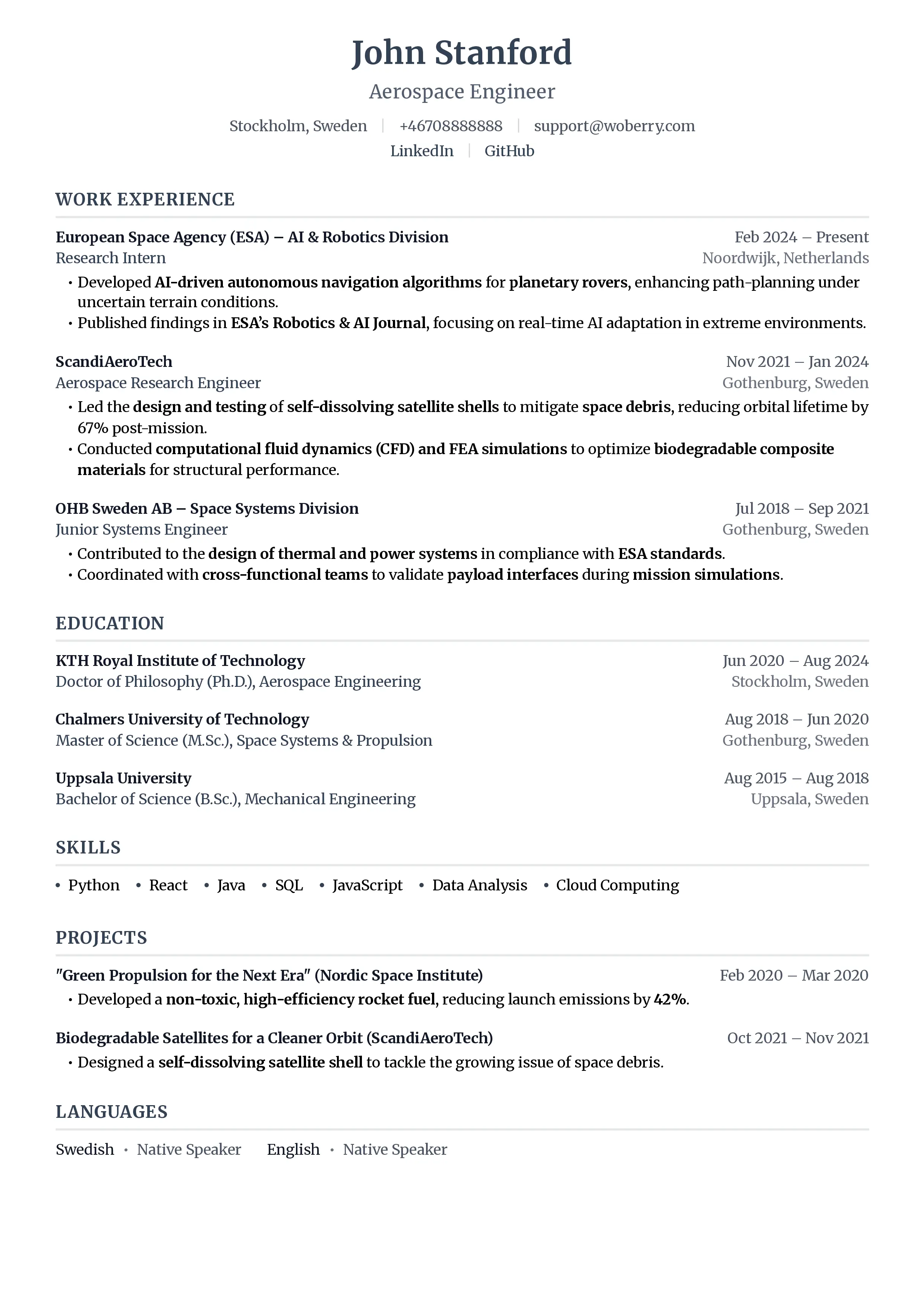
Most effective layout:
[Your Name]                    [City, State]
[Professional Title]           [Phone | Email | LinkedIn]

[Professional Summary: 2-3 sentences of relevant qualifications]
Your name and professional title should be immediately visible. If someone glances at your resume for 2 seconds, they should know who you are and what you do.
Make Job Titles and Companies Visually Prominent
Recruiters scan for titles and company names. Make them stand out:
Weak formatting:
Marketing Manager, ABC Company, New York, NY, January 2022 - Present
Strong formatting:
Marketing Manager ABC Company | New York, NY | 2022-Present
Bold job titles. Separate companies visually. Use consistent formatting that makes this information scannable.
Front-Load Bullet Points
If recruiters scan down the left side, the first few words of each bullet point matter most.
Weak (important information buried):
- Responsible for overseeing the complete digital marketing strategy that increased revenue by 40%
Strong (important information first):
- Increased revenue 40% through digital marketing strategy redesign
Lead with the result or action, not with filler phrases like "Responsible for" or "Assisted with."
Use White Space Strategically
Dense blocks of text get skipped. White space guides the eye.
Use white space to:
- Separate sections clearly
- Create visual hierarchy
- Make key information stand out
- Give the eye "resting points"
A resume with appropriate white space looks longer to scan but is actually faster to absorb.
Skills Section Placement
Skills sections receive attention when placed near the top. A skills section buried at the bottom may not be seen in initial scanning.
Consider placing skills:
- Immediately after your summary
- In a sidebar (if using columns)
- As keywords integrated into your summary
If specific skills are essential for the role, ensure they're visible in the first 3-4 inches of your resume.
What Gets Skipped
Knowing what gets ignored helps you not waste prime real estate.
Objective Statements
"Seeking a challenging position that leverages my skills..." gets skipped. It tells the recruiter nothing useful.
Long Paragraphs
Any paragraph longer than 3 lines tends to get skipped entirely. Recruiters are scanning, not reading.
Education (Usually)
Unless the job specifically requires certain education, this section receives minimal attention. Place it at the bottom for most experienced professionals.
Generic Information
"Strong communication skills," "team player," "detail-oriented" are scanned over as noise. Specific, quantified achievements register.
Dense Text Blocks
Walls of text are jumped over. If information looks hard to extract, recruiters don't try.
The Second-Pass Review
If you pass the 7-second scan, recruiters look more carefully. But even the second pass isn't thorough reading.
Second pass focus (30-60 seconds):
- Job titles and progression
- Relevance of experience to role
- Specific accomplishments
- Skills match to requirements
- Employment continuity
What triggers deeper reading:
- Strong match to job requirements
- Compelling accomplishments
- Recognizable companies or experiences
- Unusual or interesting background
Your resume should support both the quick scan (am I qualified?) and the deeper review (specifically why am I qualified?).
Formatting for Scanability
Consistent Visual Hierarchy
Use the same formatting pattern throughout:
**JOB TITLE**
Company Name | Location | Dates

- Achievement-focused bullet
- Achievement-focused bullet
- Achievement-focused bullet
Consistency helps recruiters know where to look for information.
Strategic Bolding
Bold sparingly for emphasis:
- Job titles
- Company names (optional)
- Key metrics in bullet points
Over-bolding dilutes impact. If everything is bold, nothing stands out.
Bullet Points vs. Paragraphs
Bullet points are scanned. Paragraphs are skipped.
Use bullets for:
- Accomplishments
- Responsibilities
- Skills lists
Reserve paragraphs for:
- Brief professional summary (2-3 sentences max)
Font Considerations
Easy-to-read fonts support quick scanning:
- Calibri, Arial, Helvetica (clean sans-serif)
- Garamond, Georgia, Cambria (readable serif)
- 10-12 point for body text
- 14-16 point for name
- 12-14 point for section headers
Avoid fonts that slow reading or look unprofessional.
Testing Your Resume
The 10-Second Test
Ask someone unfamiliar with your background to look at your resume for 10 seconds, then put it away.
Ask them:
- What's my name?
- What's my current job title?
- What company do I work for?
- What are 2-3 skills or accomplishments you remember?
If they can't answer these questions, your resume isn't optimized for quick scanning.
The Squint Test
Print your resume and hold it at arm's length or squint at it.
Can you identify:
- Where sections begin and end?
- Where job titles are?
- Visual hierarchy?
If everything looks like an undifferentiated mass of text, the formatting needs work.
The Highlighter Test
What would a recruiter highlight if they had 10 seconds and a marker?
If your key qualifications would get highlighted, you're on track. If generic phrases would get highlighted (or nothing clear stands out), revise.
Specific Recommendations
For the Top 2 Inches
- Your name (prominent)
- Professional title or target role
- Location (city, state)
- Contact information (phone, email, LinkedIn)
- 2-3 sentence summary with key qualifications
This section receives the most eye time. Make it count.
For Job Experience
- Bold job titles
- Company names clearly visible
- Dates easily scannable
- 3-5 bullet points per position
- Front-loaded bullets with results first
- Consistent formatting throughout
For Skills
- Relevant skills visible early
- Technical skills specific (not generic)
- Organized logically (by category or relevance)
- No more than 15-20 skills listed
For Education
- Near bottom for experienced professionals
- Near top only if required or impressive
- Degree, institution, graduation year (no older dates for experienced workers)
- GPA only if recent graduate and above 3.5
The Reality Check
Your resume's job isn't to get you hired. It's to get you an interview.
In 7.4 seconds, the recruiter decides: "might this person be worth a conversation?"
To earn a "yes":
- They need to see relevant experience quickly
- They need to see you've done similar work
- They need to see nothing that raises red flags
Everything else, including your detailed accomplishments, your career narrative, your growth trajectory, happens in the interview. The resume just opens the door.
Design for the scan that opens doors.
Ready to optimize your resume for the 7-second scan? ResumeFast's AI resume builder helps you create scannable, ATS-friendly resumes that make the first impression count.
Your resume is your first impression. Make it count.
Join 50,000+ job seekers using ResumeFast to build ATS-optimized resumes that actually get interviews.
No credit card required. Free forever.
Continue Reading
View all articles
The Complete ATS Resume Guide (2026)
Do Headers and Footers Break ATS Parsing?
Resume Keyword Density: How Often to Repeat Keywords
ATS-Friendly Fonts: Which Fonts Pass Resume Scanners
How to Find Resume Keywords in a Job Description
Why Columns and Tables Break Your Resume in ATS
Build a resume that gets interviews
Ready to build your resume?